
The KSeF function is available in the Customizing application. It allows for the activation and deactivation of the National e-Invoice System support.
Note
In order for the KSeF function to be available in the Comarch ERP Enterprise system, it is necessary to install licenses covering financial solutions for Poland and support for the Comarch e-Invoice converter.
The KSeF function of the Customizing application consists of a header and a workspace.
Header
The application header consists of the following fields:
- Function – the field displays the name of the currently open function. The field is not editable.
- Relevant for – the parameter indicates, using icons, the areas to which the function data refers
- Use OLTP client data – selecting the parameter allows for the retrieval and use of values defined within this function for the main company
- Active – the parameter allows for activating, deactivating, and defining individual function settings for the organization currently displayed on the workflow bar
Workspace
Settings tab
As a result of selecting the Active parameter in the application header, the user has the option to define parameters available in the workspace on the Settings tab:
- Date of obligatory KSeF – the field identifies the mandatory KSeF date for the financial organization issuing e-Invoices. It allows for verification of the requirement to have a KSeF invoice number for a customer’s correction invoice or an advance invoice in relation to the date specified in this field.
- KSeF test system – the parameter should be activated when the KSeF test system is being used. It is used to determine in what context QR codes are generated on invoices.
Link signature certificate section
- Certificate – in this field, a type II certificate should be specified, which will be used by default for sending sales invoices to the KSeF
- Private key – in this field, the private key should be specified, which will be used for sending sales invoices to the KSeF
- Private key password — in this place, the password for the private key specified in the Private key field should be provided
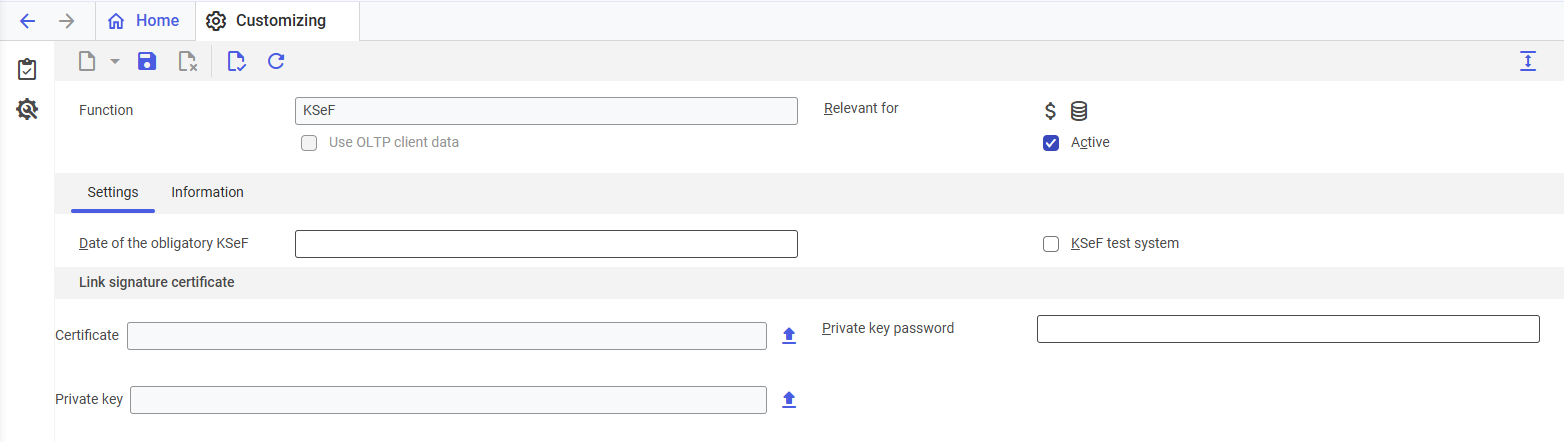
KSeF function available in the Customizing application
Information tab
The tab displays information about the KSeF function. It cannot be edited.
- App – the name of the add-on within which the function is supported is displayed
- Development object – displays the technical name of the function ext.app.erp4pl.customizing.ksef.Ksef
- License keys – the full technical name of the license key being used is displayed
- Changed by – displays the ID of the user who last introduced changes in the application
- Changed on – displays the date the last changes were introduced