
The purpose of the KSeF system availability scheduler application is to enable the user to define the time period of KSeF unavailability. Specifying the unavailability is intended to inform users about technical breaks and failures, which allows for ensuring regulatory compliance and continuity of document circulation. Defining consists of entering the necessary data directly in the KSeF system availability scheduler application.
Customer invoices generated during the unavailability mode period will be marked as documents issued in OFF or BFK mode. Depending on this marking, after the unavailability mode ends, invoices are either automatically sent to the converter or their transmission is blocked.
The application consists of a header and a line items table.
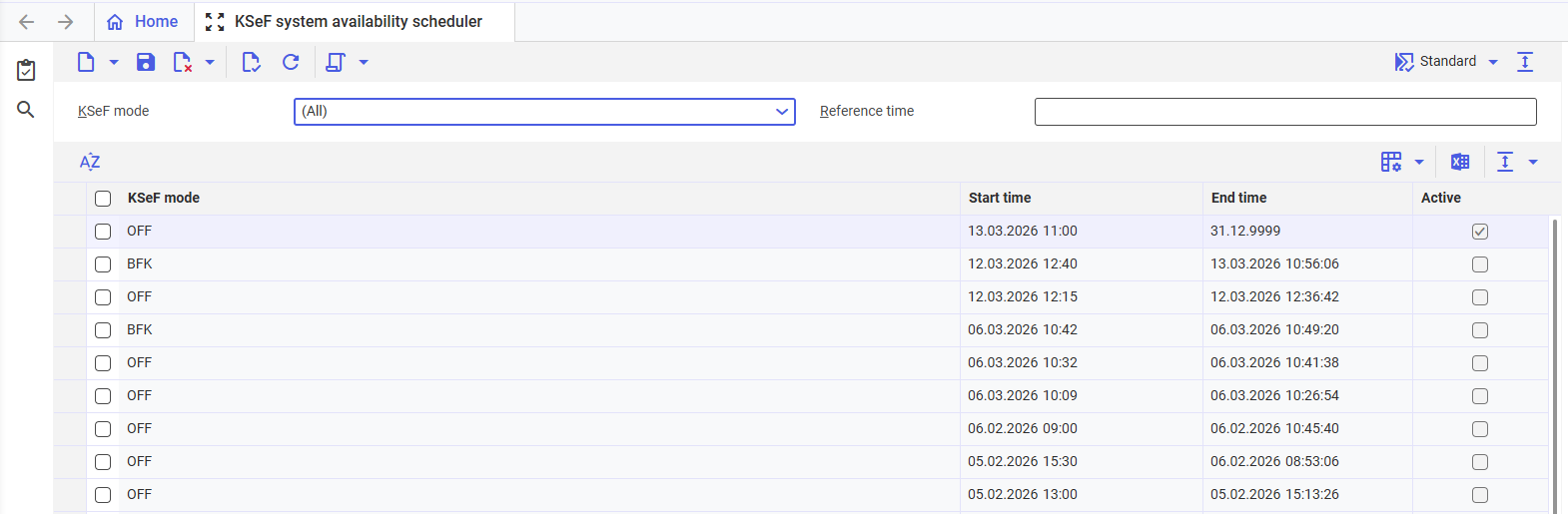
Sample KSeF system availability scheduler
Header
The application header allows for searching KSeF availability or unavailability dates and consists of the following fields:
- KSeF mode – the field allows for searching dates based on the assigned KSeF mode
- (All) – dates for both BFK and OFF modes will be displayed in the line items table
- BFK – marking for invoices issued without the involvement of KSeF. This setting is used in the event of a total system failure.
- OFF – marking for invoices issued during a KSeF unavailability period. The OFF mode includes three modes defined by the Ministry of Finance. Therefore, it can be used in case of problems on the Comarch ERP Enterprise system side, planned KSeF system unavailability (e.g., maintenance work), or KSeF failure.
- Reference time – the field is divided into two areas where it is possible to enter the date and time for the KSeF unavailability period
Line items table
The line items table indicates KSeF system unavailability periods and allows for manual entry of a new period or editing of an existing one.
The table consists of the following columns:
- KSeF mode — indicates one of the KSeF modes applicable during a given unavailability period. The following values are available:
- OFF
- BFK
- Start time — indicates the date and time of the beginning of the KSeF unavailability period
- End time — indicates the date and time of the end of the KSeF unavailability period
- Active — a selected parameter indicates the current KSeF unavailability period. The parameter is selected automatically based on the values entered in the Start time and End time
Instructions
Adding a new unavailability period
To add a system unavailability period:
- Open the KSeF system availability scheduler application.
- Select the [New] button on the standard toolbar. As a result of this action, a new table row will be added to the line items table.
- Enter the necessary information in the table row – select the BFK or OFF mode in the KSeF mode column and indicate the start and end date of the unavailability mode.
- Save the changes with the [Save] button on the standard toolbar. The unavailability period will be saved in the line items table.
Deactivation of an unavailability period
If the KSeF system unavailability mode lasts shorter than specified in the End time field, it is possible to deactivate it using the [Deactivate] action, available on the standard toolbar under the [Select action] button.
In order to deactivate the unavailability mode:
- Open the KSeF system availability scheduler application.
- Using the selection field in the line items table, indicate the unavailability mode to be deactivated.
- Select the [Deactivate] action on the standard toolbar under the [Select action] button. As a result of this action, the unavailability period will be deactivated.