
The Repository configuration application allows for the configuration of attributes exported to the Comarch ERP Enterprise system from the repository.
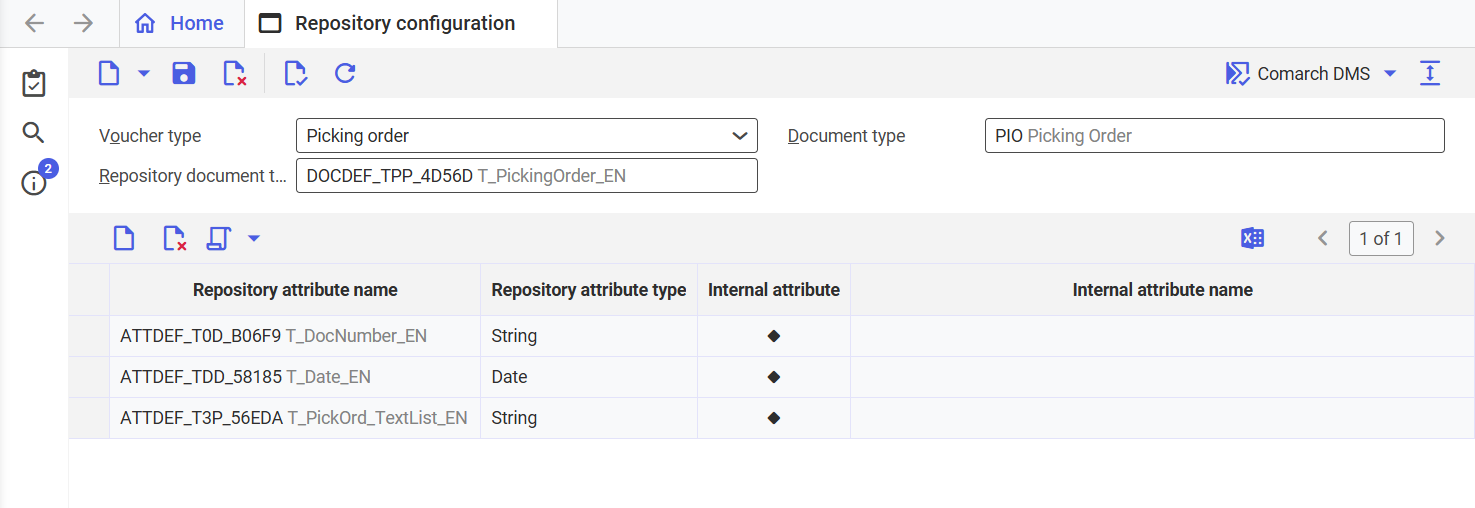
Repository configuration application
The application consists of a header and a workspace.
Header
In the application header, information regarding Comarch ERP Enterprise document types and the repository for which the attributes are being defined is entered.
Information about the buttons available on the standard action bar can be found in the Standard buttons article.
The application header consists of the following fields:
- Voucher type – in this field, you must indicate the type of document being created in Comarch ERP Enterprise. The following values are available for selection:
- Service message
- Quotation
- Pro forma invoice
- Sales contract confirmation
- Picking order
- Supplier invoice
- Inventory order
- Delivery slip
- Other document
- Production order slip
- Order confirmation
- RFQ
- Loading list
- Customer invoice
- Purchase order document
- Purchase contract confirmation
- Document type – in this field, you must indicate the document type used to save the final document in Knowledge Store. The values are defined in the Document types application.
- Repository document type – in this field, you must select one of the available repository document types. The document type is defined directly in the repository.
Workspace
The workspace consists of a table that allows for the definition of attributes for the document type defined in the header, as well as an action bar containing the following buttons:
- [New] – allows you to add a new attribute to the items table
- [Delete] – allows you to delete a defined attribute from the items table
- [Add all repository attributes] – allows you to automatically add all attributes defined for the document type in the repository
The workspace table contains the following columns:
- Repository attribute name – displays the repository attribute for the selected repository document type
- Repository attribute type – displays the repository attribute type for the selected attribute. The value is populated automatically according to the value selected in the Repository attribute name column. This parameter is retrieved from the repository and cannot be edited in this field.
- Internal attribute – the field contains a diamond button. Selecting this button opens the Select attribute dialog window, which allows you to assign an internal attribute used in the Comarch ERP Enterprise system to the repository attribute.
- Internal attribute name – displays the name of the internal attribute selected in the Internal attribute field